
Skip to main content Skip to footer
Home
User manuals

Main navigation

  • Home
  • Enterprise for Engineers
    • Program overview
      • Getting started
      • Product browser
      • Recent activity
      • Viewer tab
        • Product viewer
      • Specifications tab
        • Product Specifications viewer
        • Product documentation
        • Product buildup viewer
        • PCBA Components
        • Product sharing
      • Quotation
      • History
      • Shopping Cart
    • File menu
    • Show menu
      • Find product
      • View mode
    • Products menu
    • Operations menu
      • Import PCB
      • Panelize PCB
      • Create Stencil
      • Add Masks to PCB
      • Assembly Data Manager
      • Solder Pallet Designer
      • Depanelize PCB
      • Test Fixture
      • Test Fixture (legacy)
      • Connector chooser
      • Import 3D Mechanical Part
      • Order History
    • Configuration menu
      • Partner manager
      • User details
      • User manager
      • Options
      • Move ME to new PC
    • What's new
    • Release notes
  • Enterprise for Purchasers
    • Activity Overview
    • Product details
    • Search for product
    • Additional Operations
      • Partner manager
      • User profile
      • User manager
      • Options
  • Macaos Gallery
    • Product Browser
      • Product Explorer
      • Simple PCB Editor
        • Product operations
        • Edit operations
        • DRC report
      • Exporting product data to Gerber
      • Searching for products
      • MIF File history
      • Icon bar
      • Product info
    • Operations
      • Standard operations
        • Import PCB
        • Panelize PCB
        • Create Stencil
        • Add Masks to PCB
      • EMS version operations
        • Assembly Data Manager
        • Solder Pallet Designer
        • Depanelize PCB
        • Test Fixture
    • Technical Documentation
    • Configuration
    • Gallery PreCAM
      • Configuration options
      • Quotation module
        • Quotations
        • Calculated prices
        • Adjusting prices
        • Quotation
      • Quotation archive
        • Folders
      • Price Editor module
      • Price list editor
        • Price element editor
        • Selector editor
        • Curve editor
        • Price list wizard
      • Sales office settings
      • Holidays
      • About prices
        • Factory price
        • Retail price
        • How is a price calculated?
      • Reference
        • Price list
        • Price element
        • Curve function
        • Parameters
      • Example: Creating the Demo price list
        • Using the price list wizard
        • Refining the price list
        • Retail price
    • What's new
    • Release notes
  • Macaos Convergence
    • Using MC as a supplier
      • RFQs
      • Work orders
      • Status
      • Outgoing shipments
    • Using MC as a seller
      • Incoming orders
      • RFQs
      • Work orders
      • Status
      • Outgoing shipments
    • Reference
      • Mileposts
        • Seller mileposts
        • Receive
        • Production progress
        • QA
        • Pack/Ship
      • Create RFQ
      • Quotation viewer
      • Create/edit work order
      • Quotation response mail
      • Forwarding a quotation
      • Shipment details
        • UPS WorldShip export
      • Price Editor
        • Price list editor
        • Curve editor
        • Supplier prices
        • Retail price
        • Freight price
      • JSON Product File
  • Subsystem Manuals
    • Product editor Modules
      • Assembly Data Manager (ADM)
      • Assembly Masks
      • Depanelization
      • Import PCB
      • Mechanical Parts
      • Panelization
      • Solder Pallet
      • Solder Paste Stencils
      • SPRINT Test Fixtures
      • Test Fixtures (Legacy)
    • Product display modules
      • PCBA Components
      • Product Buildup Viewer
      • Product History
      • Product Specifications Viewer
      • Product Viewer
    • Other Modules
      • Connector Chooser
      • Order History
      • Order Status
      • Partner Manager
      • Product sharing
      • Quotation
      • Search
      • Shopping Cart
      • Two-factor authentication manager
      • User Details
      • User Manager
  • Additional info
    • Release notes
      • What's new in ME for Engineers
      • What's new in ME for Purchasers
      • What's new in Gallery
      • What's new in Convergence
      • ME for Engineers release notes
      • ME for Purchasers release notes
      • Gallery release notes
      • Convergence release notes
    • Gerber file generation tips
      • Using Altium
      • Using CADint
      • Using Eagle
      • Using KiCad
      • From other systems
    • Performance Classes
    • Solder paste stencil ratios
    • Surface finishes
    • Via types
    • Panelization scripts
  • Contact
  • Macaos website (opens in new tab)

Price list editor

Breadcrumb

  • Home
  • Macaos Convergence
  • Reference
  • Price Editor
  • Price list editor
Price list editor

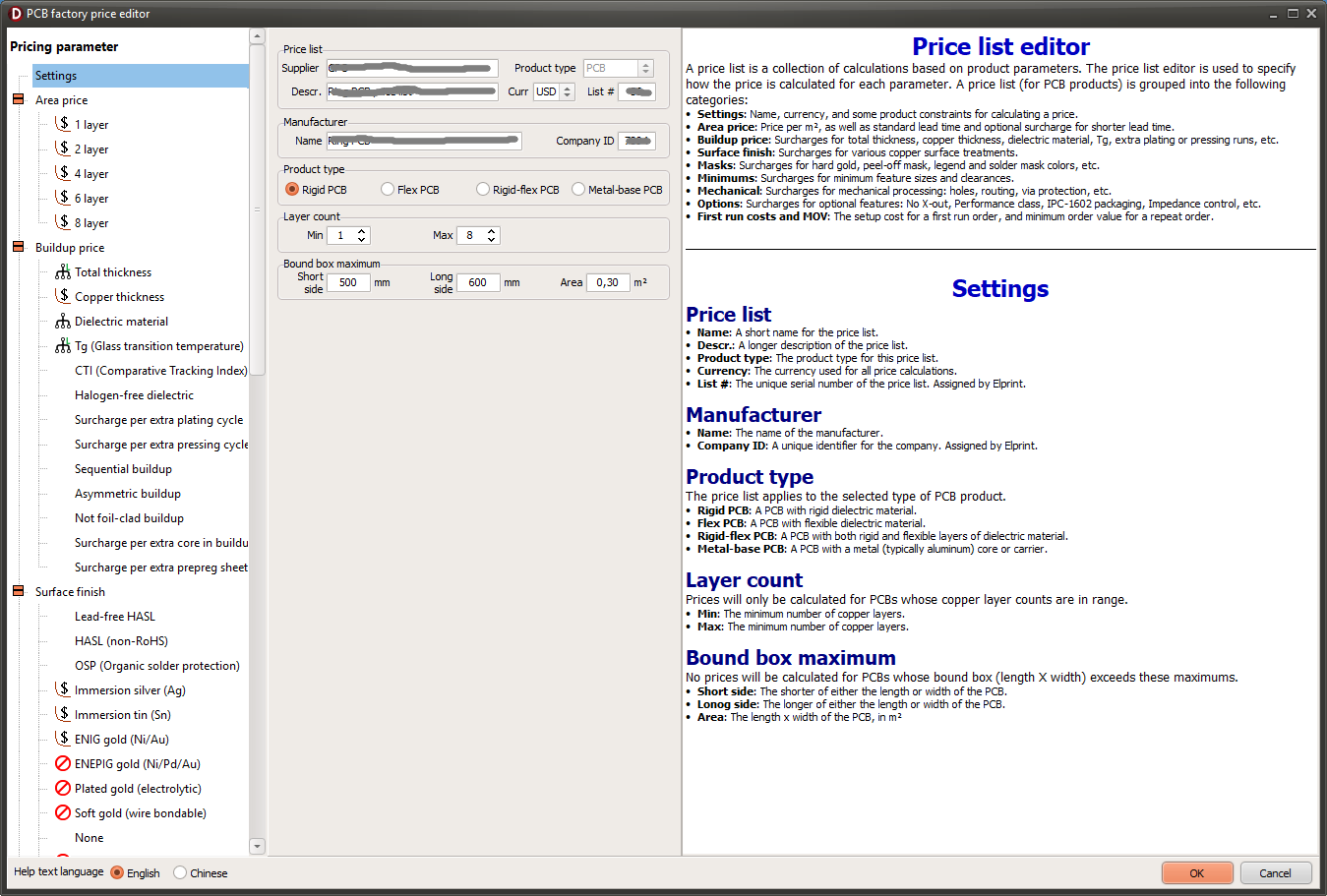
A price list is made up of several elements. These are listed in the left column of the editor. The contents of this list depend on the type of price list (supplier, retail, or freight), as well as the type of product (for factory prices). The picture above shows a portion of the price elements for a rigid PCB factory price list.

For example, a supplier price list for a rigid PCB supports price elements for about 75 parameters: total area, buildup properties, surface finish, mechanical properties, and more.

When an item in the price element list is selected, the parameters for that price element are shown, together with a help text describing the parameter and how it may be specified.

The Settings item specifies basic settings and limitations of the price list.

Specifying other price elements depends to some degree on the parameter involved. These details are described in the help text shown at the right.

General concepts

Typically, a price element can do one or more of the following:

  • Set limitations, such as no price if the parameter is above or below a threshold
  • Calculate a surcharge (in the price list currency), optionally multiplied by the total area, order quantity, or another parameter
  • Increase the price by a percentage of the area price, or the area+buildup price, or the total price
  • Increase the minimum order value and/or lead time 
  • Add a setup charge (in addition to the surcharge or percentage)

In many cases the surcharge or percentage may be defined either as a constant or as a curve (a function of the parameter). A typical example would be an increasing surcharge per m² as the thickness of a PCB layer buildup increases. The curve editor is used to define the function.

When a price list has a mix of surcharge and percentage price elements, the order in which percentages are added makes a difference. Normally, the total price is calculated in the order of the price element list. However, if an element specifies a percentage of the total price, then this percentage is added after all other elements, except the lead time and minimum order value (MOV) price elements. The lead time price element is always added last, and then the final price will be the larger of the total price calculated or the MOV.

Selector tabs

For some price elements, it may be desirable to specify different pricing for different cases. For example, the surcharge for high-Tg laminate material might be different for 0-2 layer PCBs than for multilayer. Click on a selector tab to specify the price element for the selected condition. Selector tabs may be managed with the menu button at the top of the price element editor pane.


Book traversal links for Macaos Convergence

  • ‹ Price Editor
  • Up
  • Curve editor ›

Elprint AS
Sanddalsringen 5b
N-5225 Nesttun
Norway

Download gerber specification
ODB++ partner
IPC member

Footer menu

  • Privacy policy
Powered by Drupal

Copyright © 2026 Elprint AS - All rights reserved