
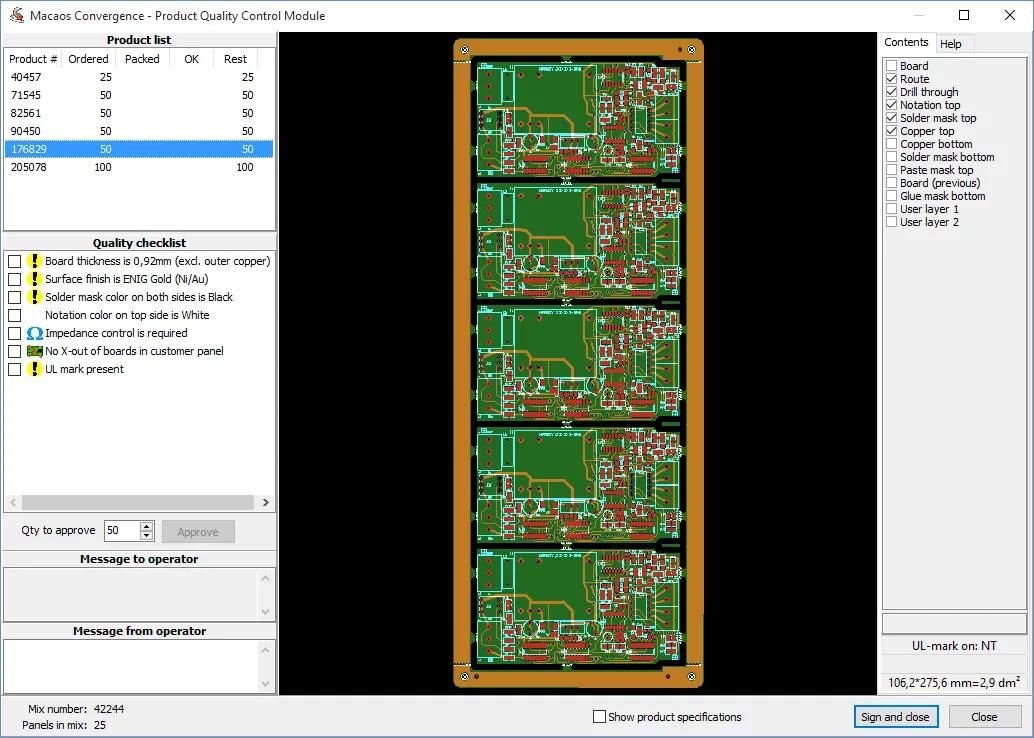
The QA milepost opens the Product Quality Control module, which is used to approve products for shipment after examining that they have been manufactured according specification. Note: This inspection does not eliminate the need for the supplier to carry out their normal measurements of production processes and parameters and to create a certificate of conformity.
This module lists the product(s) in the work order, and their approval status. The four columns are:
- Ordered: The quantity ordered on this work order
- Packed: The approved and packed quantity of this product at the supplier
- OK: The approved but not yet packed quantity of this product at the supplier
- Rest: The quantity awaiting approval
For each product, a number of characteristics of each item should be examined and checked off in the checklist. Once all characteristics have been checked off, then enter the quantity which have been examined and click on the Approve button. This will update the OK and Rest values for the product. If necessary, items may be unapproved by right-clicking on the product and choosing the Unapprove all command.
Once all items in the work order (WO) have been approved, click on the Sign and Close button to sign the milepost and optionally upload a zip file containing quality documentation. If only a portion of the items required to fulfill the WO have been examined, use the Close button instead. Note: To avoid confusion, if there are multiple active WOs for the same product then all items for the first due WO should be packed before beginning to approve items for the next WO.
Messages may be attached to the QA milepost in the same manner as with other mileposts. Only the supplier may mark items as approved. Other users may only view the quality checklist and leave a message to the operator.
The product viewer is useful for comparing the finished product to the manufacturing data. Use the Show product specifications check box to show/hide additional product information.